搭建一个全自动STEAM挂刀前后端
Aims
- 能够实时对饰品售出比例、求购比例做监控
- 能够自动更改价格(涉及到 STEAM 令牌生成、交易确认等过程)
- 能够爬取低比例饰品
- 能够对饰品做可视化管理
- 能够对不同账户进行管理
- 较为安全的信息保存/处理方式
- …
后端
环境
计划使用FASTAPI作为后端。先使用Conda创建环境,并安装FASTAPI
pip install fastapi[all]使用uvicorn作为运行程序的服务器
先写好最基本的框架
import uvicornfrom fastapi import FastAPI
app = FastAPI()
if __name__ == "__main__":    uvicorn.run("main:app", host="0.0.0.0", port=4345)
STEAM 相关
登录
作为初版,我打算直接使用 cookie 作为 para 进行登录操作,在后面的版本中可能会考虑迭代为账密形式
要想实现 steam 的登录,首先就要抓相关请求。
原理
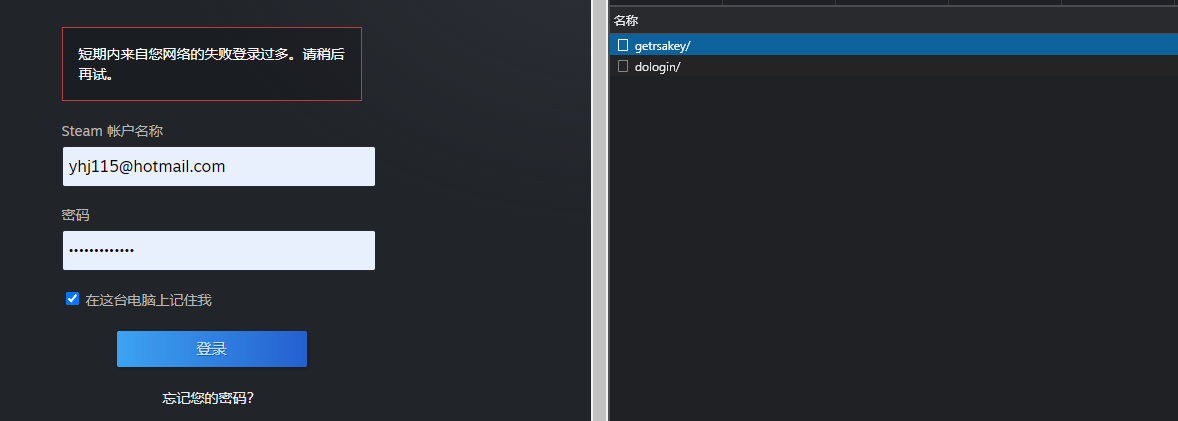
- 通过
getrsakey/拿到了账户的public_key,payload里是donotcache项和username项
其中,donotcache是timestamp*1000并舍弃小数部分,username就是明文的Steam 账户名称
返回的 json 是形如
{ "success": true, "publickey_mod": "deadbeef0deadbeef0deadbeef", "publickey_exp": "010001", "timestamp": "216071450000", "token_gid": "deadbeef0deadbee"}的形式。
给出了modulus和exponent,需要我们自己生成公钥并加密密码
即
$$ c = m^e \pmod m $$
- 通过
dologin/,以不同的payload来进行登录及2fa的验证
通常的payload如下:
{ "donotcache": 1646663656289, // 同上文时间戳 "password": "base64_encoded_encrypted_password", // 经过base64之后的rsa公钥加密的二进制数据 "username": "username", // 用户名 "twofactorcode": "Guard_Code", // 手机令牌 "emailauth": "", // 邮箱验证码 "captchagid": 4210307962151791925, // CaptchaGID, 由`do_login/`返回值 获取, 并在`https://steamcommunity.com/login/rendercaptcha/?gid=%captchagid%`处获取Captcha图片 "captcha_text": "th37yr", // Captcha验证码, 如果需要的话,与上项应同时存在 "rsatimestamp": 216071450000, // RSA过期时间,在`getrsakey/`中可以获取 "remember_login": true // 保存登录信息(虽然我们不需要)}结果通过不同的返回值告知,例如:
{ "success": false, "requires_twofactor": true, "message": ""}{ "success": false, "message": "请重新输入下方验证码中的字符来验证此为人工操作。", "requires_twofactor": false, "captcha_needed": true, "captcha_gid": "4209182061243079173"}实现
采用aiohttp进行交互
import base64import rsaimport time
from aiohttp import ClientSessionfrom typing import Dict
BASE_STEAM_URL = "https://steamcommunity.com"GET_RSA_KEY_API_URL = "/login/getrsakey/"DO_LOGIN_API_URL = "/login/dologin/"LOGIN_URL = "/login?oauth_client_id=DEADBEEF&oauth_scope=read_profile%20write_profile%20read_client%20write_client"

class Response(Dict):
    def __getattr__(self, item):        return self.get(item)
    def __setattr__(self, key, value):        self.__setitem__(key, value)

async def do_login(username: str,                   password: str,                   twofactorcode: str = '',                   emailauth: str = '',                   captchagid: int = 0,                   captcha_text: str = '',                   headers: Dict = None,                   cookies: Dict = None,                   **kwargs) -> Response:    """    login steam and return the Response    :param username: steam username    :param password: steam password, should be plaintext    :param twofactorcode: optional, steam guard code    :param emailauth: optional, steam email guard code    :param captchagid: optional, steam will tell it if needed    :param captcha_text: optional, captcha text, should be set together with captchagid    :param headers: optional, custom headers    :param cookies: optional, custom cookies    :param kwargs: optional, args for ClientSession    :return:    """    if headers is None:        headers = {"X-Requested-With": "com.valvesoftware.android.steam.community",                   "Referer": "https://steamcommunity.com/mobilelogin?oauth_client_id=DEADBEEF&oauth_scope=read_profile%20write_profile%20read_client%20write_client"}    if cookies is None:        cookies = {"mobileClientVersion": "0 (2.3.13)",                   "mobileClient": "android",                   "Steam_Language": "schinese"}
    async with ClientSession(headers=headers, cookies=cookies, **kwargs) as session:        data = {            "donotcache": int(time.time()*1000),            "username": username        }        async with session.post(BASE_STEAM_URL + GET_RSA_KEY_API_URL, data=data) as resp:            if resp.status == 200 and (response := await resp.json()).get("success"):                response = Response(response)                modulus = int(response.publickey_mod, 16)                exponent = int(response.publickey_exp, 16)                rsa_timestamp = response.timestamp            else:                if resp.status == 200:                    raise ConnectionError(f"Get RSA Key Error! [{resp.status}]: {response}")                else:                    raise ConnectionError(f"Get RSA Key Error! Error Code: {resp.status}")
        public_key = rsa.PublicKey(modulus, exponent)        en_password = password.encode(encoding='UTF-8')        en_password = rsa.encrypt(en_password, public_key)        en_password = base64.b64encode(en_password)
        data = {            "donotcache": int(time.time() * 1000),            "username": username,            "password": en_password.decode('UTF-8'),            "twofactorcode": twofactorcode,            "emailauth": emailauth,            "rsatimestamp": rsa_timestamp,            "remember_login": True        }        if captchagid and captcha_text:            data["captchagid"] = captchagid            data["captcha_text"] = captcha_text        async with session.post(BASE_STEAM_URL + DO_LOGIN_API_URL, data=data) as resp:
if resp.status == 200: response = Response(await resp.json()) if response.success: response.cookie = resp.cookies.output() response.cookie_object = resp.cookies return response else: raise ConnectionError(f"Login Error! Error Code: {resp.status}")整体比较简单,没什么好说的。创建了个Response类省去一点点时间。
值得注意的是当登陆成功时我传入了一个cookie和一个cookie_object(Simplecookie对象),方便后续的使用。
TODO: raise 的是
ConnectionError,后续可能会自己创建几个异常专门处理。
令牌
在实现令牌的生成之前,我们先来了解一下令牌的实现原理
实现原理
首先明确的是,STEAM 令牌的生成算法是一种称为Time-based One-time Password(TOTP)的算法
根据 steam 令牌生成所使用的RFC-6238标准,在这种算法的实现过程中,Client和Server需要协商一个共同的Secret作为密钥——也就是在令牌详细数据里的shared_secret项
此时,由默认的T0(Unix Time)和T1(30s)以及当前的时间戳计算出将要发送的消息C(计数,即从T0到现在经过了多少个T1),并使用Secret作为密钥,通过默认的加密算法SHA-1计算出HMAC值
取HMAC的最低 4 位有效位作为byte offset并丢弃
丢弃这 4 位之后,从byte offset的MSB开始,丢弃最高有效位(为了避免它作为符号位),并取出 31 位,密码便是它们作为以 10 为基数的数字。
STEAM 在这个基础上,对数字进行了CODE_CHARSET的对应。具体方法是将密码所对应的 10 进制数除以CODE_CHARSET的长度,余数作为CODE_CHARSET的下标,商作为新的 10 进制数继续进行以上运算,直到取出 5 个数为止。
此处的
CODE_CHARSET及对应算法未找到相关来源,推测应该是反编译了STEAM客户端or 高手的尝试
实现过程
重复造轮子是有罪的。本着既然都是自己用那多安几个库也无所谓的想法,我选择了pyotp库作为一键TOTP生成工具。
然而失败了,不知道什么原因 base32 的 secret 生成出来不正确
本着既然已经研究透彻了实现原理的心态,我决定手动实现一次这个算法,同时,不使用现成的库也可以精简一下项目。
import hmacimport hashlibimport timeimport base64

def gen_guard_code(shared_secret: str) -> str:    """    Generate the Guard Code using `shared_secret`    :param shared_secret: shared_secret, should be a base64-encoded string    :return: the guard code    """    shared_secret = shared_secret.encode('UTF-8')    b64_decoded_shared_secret = base64.b64decode(shared_secret)    time_bytes = (int(time.time()) // 30).to_bytes(8, byteorder='big')  # Turn time_stamp into a 64 bit unsigned int    hmac_code = hmac.new(b64_decoded_shared_secret, time_bytes, hashlib.sha1).digest()  # Generate HMAC code    byte_offset = hmac_code[-1] & 0xf  # Get last 4 bits as bytes offset    code_int = (        (hmac_code[byte_offset] & 0x7f) << 24 |  # Drop off the first bit (MSB)        (hmac_code[byte_offset+1] & 0xff) << 16 |        (hmac_code[byte_offset+2] & 0xff) << 8 |        (hmac_code[byte_offset+3] & 0xff)    )    CODE_CHARSET = [50, 51, 52, 53, 54, 55, 56, 57, 66, 67, 68, 70, 71,                    72, 74, 75, 77, 78, 80, 81, 82, 84, 86, 87, 88, 89]    codes = ''    for _ in range(5):        code_int, i = divmod(code_int, len(CODE_CHARSET))        codes += chr(CODE_CHARSET[i])    return codes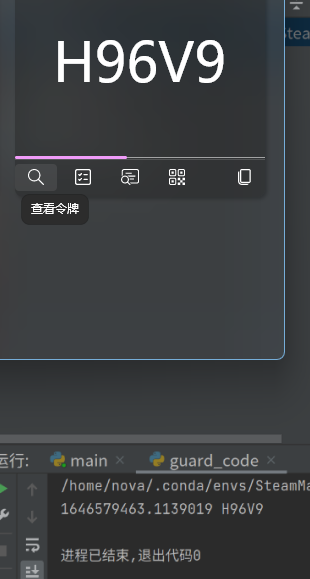
交易确认
交易应该算是 STEAM 相关的最麻烦的东西了。需要identity_secret和device_id作为参数。
确认列表
通过手机端抓包可以知道确认界面相关的API_URL是https://steamcommunity.com/mobileconf/conf?%payload%
首先我们需要实现的是fetch_confirmation_query_params,也就是获取确认的列表
需要的参数有
| Param | Description |
|---|---|
| p | device_id |
| a | steam_id |
| t | 时间戳 |
| m | 设备(Android/IOS) |
| tag | 标签,唯一值conf(待确定) |
| k | timehash,由time_stamp和tag作为参数,由identity_secret作为密钥生成的 Base64 编码的HMAC码 |
首先写出timehash的生成
import base64import hashlibimport hmacimport time

def gen_confirmation_key(times: int, identity_secret: str, tag: str = 'conf') -> str:    """    Generate the secret for confirmation to check.    :param times: time_stamp, should be int instead of float    :param identity_secret:    :param tag: 'conf', 'allow', 'cancel', 'details%id%'    :return: base64-encoded secret, which is not urlencoded.    """    msg = times.to_bytes(8, byteorder='big') + tag.encode('UTF-8')    key = base64.b64decode(identity_secret.encode('UTF-8'))    secret = hmac.new(key, msg, hashlib.sha1).digest()    return base64.b64encode(secret).decode('UTF-8')
之后写出请求的调用,确认页面似乎没有前后端分离,因此我们只能通过爬虫爬取确认列表。
from aiohttp import ClientSessionfrom urllib.parse import urlencode, quote_plus
from typing import Union, Dict, Listfrom http.cookies import SimpleCookie

BASE_STEAM_URL = "https://steamcommunity.com"MOBILECONF_URL = "/mobileconf/conf"

async def fetch_confirmation_query(cookies: Union[Dict, SimpleCookie],                                   steam_id: str,                                   identity_secret: str,                                   device_id: str,                                   tag: str = "conf",                                   m: str = "android",                                   headers: Dict = None) -> Dict[str, Union[str, List[Dict]]]:    """    fetch confirmation query as a list of json dict.    :param cookies: Cookies contains login information    :param steam_id: 64bit steamid    :param identity_secret:    :param device_id:    :param tag: 'conf'    :param m: 'android', 'ios'    :param headers:    :return: Response of confirmation query.    """    if headers is None:        headers = {            "X-Requested-With": "com.valvesoftware.android.steam.community",            "Accept-Language": "zh-CN,zh;q=0.9"        }    times = int(time.time())    query = {        "p": device_id,        "a": steam_id,        "k": gen_confirmation_key(times, identity_secret, tag),        "t": times,        "m": m,        "tag": tag    }
async with ClientSession(headers=headers, cookies=cookies) as session: print(BASE_STEAM_URL + MOBILECONF_URL + '?' + urlencode(query)) print(urlencode(query, safe=":"), type(urlencode(query))) async with session.get(BASE_STEAM_URL + MOBILECONF_URL + '?' + urlencode(query)) as resp: if resp.status == 200: # do something pass else: raise ConnectionError(f"Fetch Confirmation Error! Error Code: {resp.status}")根据以前的习惯,我仍选择了beautifulsoup4作为提取器,lxml作为解析器
from bs4 import BeautifulSoup

def steam_confirmation_parser(html: str):    soup = BeautifulSoup(html, 'lxml')    confirmations = soup.find_all("div", class_="mobileconf_list_entry")    if len(confirmations):        data_list = []        for confirmation in confirmations:            data = {                "type": confirmation.get('data-type'),                "confid": confirmation.get('data-confid'),                "key": confirmation.get('data-key'),                "creator": confirmation.get('data-creator'),                "accept_text": confirmation.get('data-accept'),                "cancel_text": confirmation.get('data-cancel'),                "img": confirmation.find('img')['src'],                "desc": "\n".join(confirmation.stripped_strings)            }            data_list.append(data)        return {            "success": True,            "data": data_list        }    return {        "success": soup.find('div', id="mobileconf_empty"),        "data": ["\n".join(soup.find('div', id="mobileconf_empty").stripped_strings)]        if soup.find('div', id="mobileconf_empty") else ["Invalid Html\nIt is not a parsable html."]    }
发送请求
有了上面的基础,发送请求是很容易的。
url是https://steamcommunity.com/mobileconf/ajaxop?%payload%
payload的参数如下
| Param | Description |
|---|---|
| p | device_id |
| a | steam_id |
| t | 时间戳 |
| m | 设备(Android/IOS) |
| op | 动作,有cancel和allow |
| k | timehash,由time_stamp和op作为参数,由identity_secret作为密钥生成的 Base64 编码的HMAC码 |
| cid | data-confid,在class为mobileconf_list_entry的<div>标签中给出 |
| ck | data-key,在class为mobileconf_list_entry的<div>标签中给出 |
AJAX_POST_URL = "/mobileconf/ajaxop"
async def send_confirmation_ajax(cookies: Union[Dict, SimpleCookie],                                 steam_id: str,                                 identity_secret: str,                                 device_id: str,                                 cid: str,                                 ck: str,                                 op: str = "allow",                                 m: str = "android",                                 headers: Dict = None) -> bool:    """    Send AJax post to allow/cancel a confirmation    :param cookies: Cookies contains login information    :param steam_id: 64bit steamid    :param identity_secret:    :param device_id:    :param cid: data-confid    :param ck: data-key    :param op: `allow` or `cancel`    :param m: 'android', 'ios'    :param headers:    :return: The status    """    if headers is None:        headers = {            "X-Requested-With": "XMLHttpRequest",        }    times = int(time.time())    query = {        "op": op,        "tag": op,        "p": device_id,        "a": steam_id,        "k": gen_confirmation_key(times, identity_secret, op),        "t": times,        "m": m,        "cid": cid,        "ck": ck    }    async with ClientSession(headers=headers, cookies=cookies) as session:        async with session.get(BASE_STEAM_URL + AJAX_POST_URL + '?' + urlencode(query)) as resp:            print(await resp.read())            if resp.status == 200:                return (await resp.json()).get('success')            else:                raise ConnectionError(f"Send Confirmation Ajax Error! Error Code: {resp.status}")
详情
物品详情也有一个 api,不过我暂时没有想好怎么用,总之先把它写出来了
| Param | Description |
|---|---|
| p | device_id |
| a | steam_id |
| t | 时间戳 |
| m | 设备(Android/IOS) |
| tag | 标签,details%id%,id为data-confid,在class为mobileconf_list_entry的<div>标签中给出 |
| k | timehash,由time_stamp和tag作为参数,由identity_secret作为密钥生成的 Base64 编码的HMAC码 |
TODO
DETAIL_URL = "/mobileconf/details/"
async def fetch_confirmation_details(cookies: Union[Dict, SimpleCookie],                                     steam_id: str,                                     identity_secret: str,                                     device_id: str,                                     cid: str,                                     m: str = "android",                                     headers: Dict = None) -> Dict[str, str]:    """    Fetch a confirmation's details    :param cookies: Cookies contains login information    :param steam_id: 64bit steamid    :param identity_secret:    :param device_id:    :param cid: data-confid    :param m: 'android', 'ios'    :param headers:    :return: The Response    """    if headers is None:        headers = {            "X-Requested-With": "com.valvesoftware.android.steam.community",            "Accept-Language": "zh-CN,zh;q=0.9"        }    times = int(time.time())    tag = "details" + cid    query = {        "tag": tag,        "p": device_id,        "a": steam_id,        "k": gen_confirmation_key(times, identity_secret, tag),        "t": times,        "m": m,    }    async with ClientSession(headers=headers, cookies=cookies) as session:        async with session.get(BASE_STEAM_URL + DETAIL_URL + cid + '?' + urlencode(query)) as resp:            if resp.status == 200:                return await resp.json()            else:                raise ConnectionError(f"Fetch Confirmation Details Error! Error Code: {resp.status}")